
Download Antimicro – Map Your Controller Easily
Antimicro lets you map your keyboard and mouse buttons directly to your controller, making it perfect for PC games that lack built-in gamepad support. Get the safest and latest versions below.


Controller Mapping
Bind any keyboard key or mouse movement to your controller with high customization.

Easy Setup
User-friendly interface lets even beginners set up controller profiles within minutes.

Open-Source & Safe
Antimicro is fully open-source, transparent, and secure with verified releases.
AnitMicro/AntimicroX
(Latest Version)
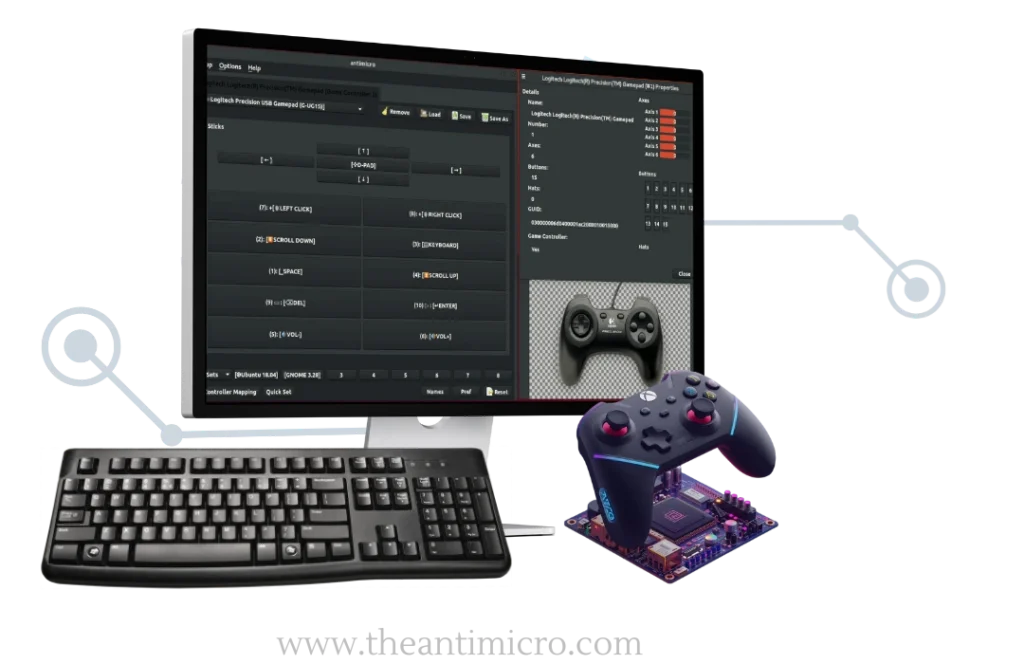
- ⚙️ Easy Set Up
- 🎮 Multiple Game Support
- 🧩 Versatile
- 💸 Free To Use

Download AntiMicro Safely: Map Game Controller to KBM Shortcuts
Want to use your joystick, controller, or gamepad in a game or PC that doesn’t support controller inputs? No worries, AntiMicro makes that possible. This graphical program is an open-source project. It lets you map keyboard keys and mouse movements to a controller or joystick. With AntiMicro software, you can control any game, emulator, or even desktop app using your gamepad. PC users can use a controller even if the game doesn’t support one, and it costs nothing. AntiMicro is light on system resources, so it works even on older computers. You can create your own comfortable and responsive controller setup for almost any game or application.
In this guide, we have explained how to download AntiMicro, install it, and map your controller buttons for any game, emulator, or desktop software. With AntiMicro software, you can turn any controller into a powerful keyboard–mouse setup and enjoy precise, responsive, and fully personalized gameplay.

What is Antimirco Free Keyboard To Controller Software?
AntiMicro is an open-source gamepad mapper developed for keyboard & mouse emulation for gamepad/controller/joystick setups. It lets users assign keyboard keys, mouse actions, scripts, and macros to their controller buttons. Players can take full control of any game or desktop application that lacks native controller support. The software automatically detects connected input devices and provides a clear, tab-based interface for customizing profiles.
Many older PC games, such as Diablo II, StarCraft, Age of Empires, Half-Life, RuneScape, RimWorld, Dwarf Fortress, Civilization V, and other classics, were never built with gamepad support.
So, if you want to enjoy these classics with controllers, you need a reliable controller input mapping tool, and that’s where AntiMicro comes in for free. But AntiMicro stopped updating years ago, and its GitHub page got archived as read-only in January 2023. With no fixes since its last release in 2017, users were left with crashes, poor device support, and zero updates. The recommended and actively developed replacement is AntiMicroX. You should switch to AntiMicroX for continued support and new features.
The active fork, AntiMicroX, continues development with better compatibility, modern controller support, and a refined interface. The latest AntiMicroX 3.4.1 version is available for free download below and runs on Windows, Linux, and macOS.
What is AntiMicroX: New Updated Version?
AntiMicroX is the fork (community-built) version of the discontinued AntiMicro. The developers have kept the same mapping features with active development and new bug fixes. It maps keyboard and mouse actions to a controller or joystick, useful for games that lack proper gamepad support or need custom inputs. The software has the familiar layout but offers lag-free performance, better device support, and improved compatibility on newer platforms, including Wayland on Linux. The latest AntiMicroX 3.4.1 version is available for free download below and runs on Windows, Linux, and macOS.
AntiMicro vs. AntiMicroX: What’s The Difference Between Gamepad Mappers?
Old AntiMicro users still show interest today, so we’ve outlined the key differences below. AntiMicroX keeps the same idea but delivers the features most people expect on newer systems. The comparison table highlights what has changed, what stayed the same, and why the newer fork is the recommended option.
| Feature | AntiMicro (Original) | AntiMicroX (Updated Fork) |
| Status | Archived, no active fixes since 2017 | Actively maintained with new updates |
| Main Use | Maps gamepad to keyboard and mouse | Same purpose, plus scripts, executables, and macros |
| Performance | Can lag or break on newer systems | Stable and optimized for modern setups |
| Modern OS Support | Works on Windows and Linux (X.org only) | Supports Windows, Linux (X.org + Wayland), macOS via builds |
| Controller Support | Basic support, outdated device handling | Better support for newer and modern controllers |
| Linux Support | No Wayland compatibility | Enhanced Wayland support and AppImage + Flathub builds |
| Advanced Actions | Tap-and-hold actions, switchable profiles | Includes advanced macros, scripts, auto-profiles, and reliable profile saving |
| User Interface | Simple GUI, no updates to fix bugs | Same familiar layout with improved stability and smoother controls |
| Distribution | No new releases after 2.24 | Latest version 3.4.1 with continuous upgrades |
| Usage Scope | Mostly for games without controller support | Works for games and desktop automation tools |
What’s New in Antimicrox 3.4.1? (2026 Update)
The latest AntiMicro 3.4.1 release improves controller mapping for a cleaner and more reliable experience across Windows and Linux. Here are the newest updates, bug fixes, and performance improvements in Antimicro:
Improved Cross-Platform Compatibility
Full support for AntiMicro Windows & Linux with SDL 2.0.5 fixes and faster performance.
Advanced Input Customization
Control input timing, response speed & create macros using the new Advanced Settings panel.
Turbo Mode
Automate rapid key presses with adjustable repeat speed & delay — perfect for gaming.

Expanded Controller Mapping
Map mouse movement, scroll wheel & shortcuts directly to controller buttons.

Profile Saving & Multi-Setup
Create, save & switch between custom controller profiles instantly.

Better Logging & Debugging
New debug messages & detailed logging for tracking controller & profile behavior.

Portable Version Fixes
Runs smoothly without missing dependencies — fully plug-and-play.

Updated Build System
Automatically detects required libraries for stable installation.

Community Driven
AntiMicro continues improving thanks to active open-source contributions.
Key Features of AntiMicro & AntiMicroX Over Other Mapping Softwares
AntiMicro for PC isn’t just a controller mapping utility; it’s a full controller binding software that gives players deeper control over unsupported games and apps. Below are the standout features that make it an essential tool for PC gamers and emulator users alike.
Free and Lightweight
AntiMicro/AntiMicroX is completely free for Windows and Linux. Users get full functionality without ads or premium restrictions. The installer is under 60 MB and runs efficiently even on low-end systems. It supports the most popular gamepads instantly after connection, showing device names directly. No hard interface or settings, simple open and connect function.

Open-Source and Secure
It’s distributed under the GPL v3 license, which means it’s an open-source software that values transparency and safety. The codebase is publicly available, allowing developers to review, improve, or customize the tool. Community-driven updates make it reliable for players who prioritize security and control. you get regular updates that help you keep your gaming control updated.

Simple Graphical Mapping
AntiMicro provides a clean graphical interface for joystick axis remapping and controller button mapping. Easily assign keyboard presses, mouse clicks, or macros & hotkeys to controller buttons in minutes. This lets you transform unsupported PC games into full controller-ready experiences, offering console-like responsiveness without complex setup.
Broad Controller Support
It works with nearly every controller, Xbox, PlayStation (PS4/PS5), Nintendo Pro, and generic USB or Bluetooth gamepads. AntiMicro converts controller inputs into keyboard and mouse actions, letting you play PC titles that lack native support. This versatile cross-device peripheral configuration makes it the most popular even in 2025.

Easy to Set Up
Installing AntiMicro or AntiMicroX is quick and user-friendly. As soon as you open it, the software automatically detects connected controllers and shows button indicators in real time. Assigning functions is intuitive: click a button, choose an action, and save it. The modern user interface helps players map buttons effortlessly, even on their first use.

Create and Save Controller Profiles
You can create controller profiles for individual games or apps. AntiMicro profiles for games automatically load the right setup when a specific title is launched. Players can save multiple profiles, manage multiplayer setups, or switch mappings mid-game.

Strong Performance and Compatibility
AntiMicro is known for stable performance on Windows and major Linux distributions, but it shows its age across newer platforms. AntiMicroX builds on that foundation, running efficiently on modern Linux desktops, Wayland environments, and updated Windows systems. It supports portable and installed formats, uses fewer resources, and handles multiple controllers without crashes or delayed reactions.

Dependency on SDL2 / SDL2 Configuration
Both tools depend on the SDL2 library for mapping inputs. Older AntiMicro required manual setup that confused many users. AntiMicroX still uses SDL2, yet offers broader support for systems that rely on it, making joystick-to-keyboard mapping more reliable. It works across Windows, Linux, and FreeBSD, mapping commands, scripts, and macros through SDL2 without extra drivers.

Smart One-Button Actions
With AntiMicro, one button can handle multiple actions or launch programs, ideal for multitasking gamers. You can set a single trigger to open apps, reload, pick up items, or control media. It simplifies your setup while keeping every action close at hand through precise controller mapping.

Hold and Release Controls
AntiMicro & AntimicroX both recognize button-press duration to trigger different outcomes. For example, holding a button might activate “aim” mode, while releasing it could execute “shoot.” This responsive control adds precision and realism for players who need dynamic in-game input customization.

Analog Control
Analog Control lets you read how far a stick is pushed, which affects movement intensity. The original AntiMicro struggled to translate these ranges into keyboard actions, leading to full-speed results instead of gradual motion. AntiMicroX improves this area with better sensitivity handling, gyroscope inputs, and more advanced macros that adjust cursor and movement speed based on stick pressure.

Mouse Speed
Mouse Speed assigns controller inputs to imitate cursor movement. Older AntiMicro relied on basic values, making precise control difficult when switching from fast movement to slower aiming. AntiMicroX introduces modifiers, acceleration curves, and improved trigger behavior, giving users adjustable precision for aiming, camera control, and desktop use without harming game rules or system input limits.

Advanced Input Customization (Turbo Button Remap & More!)
The tool supports complex combinations through turbo button remap, macros, and fine-tuned analog control. Adjust mouse movement speed, customize aim sensitivity, and automate quick-tap actions using Turbo Mode. These advanced options give players full creative control over their controller behavior across all types of games.
Antimicro for PC: What It’s Used For and Who Needs It
Many gamers will pick the feel of a controller over a keyboard and mouse any day. AntiMicro bridges that gap on PCs that don’t have native controller support. Users can map any controller input to keyboard or mouse actions. It’s ideal for players who dislike keyboard-and-mouse setups, enjoy old games, or run gaming rigs connected to TVs. Basically, if you want console-style control on your computer, this software is for you.

Playing Older PC Games Without Gamepad Support
Many classics like Diablo II, StarCraft, RuneScape, and Half-Life never included controller support. With AntiMicro gamepad mapper, you can remap those keyboard and mouse controls to your joystick or gamepad, giving older games a console-like feel without complex setup or mods.

PCs Connected to a TV or Couch Setup
If your PC is hooked to a TV, AntiMicro’s keyboard-to-controller mapping turns your gamepad into a full remote. Scroll, click, and play directly from the couch – no need to reach for your keyboard or mouse while gaming or streaming.

Players with Accessibility Needs
Many players find controllers more comfortable or easier to handle than traditional peripherals. AntiMicro allows keyboard and mouse emulation for gamepad setups, helping users with mobility limitations enjoy games and applications through fully customizable input mapping.

Gamers Who Simply Prefer Controllers
Some gamers just dislike using WASD or mouse aiming. With AntiMicro, they can play almost any title using a controller, even when gamepad support isn’t included, creating a consistent, controller-first experience across their PC library.

Tinkerers & Power Users
Advanced users love AntiMicro for its flexibility. They use controller input mapping to control media, launch apps, or manage shortcuts, turning any controller into a powerful all-in-one PC remote that adapts to every workflow or gaming style.
How to Download AntiMicro (Old Version)
AntiMicro is archived on GitHub and no longer updated. It still works, but new users should install AntiMicroX for better support. Here are the quick download steps:


How to Download AntiMicroX on PC (Windows Guide)
Many users don’t want to download the old version, and AntiMicroX is their top choice, which is another active and updated fork of AntiMicro. Here is the safest download link and the guide on how to install AntiMicroX for Windows:
How To Launch AntimicroX?
To launch antimicro/AntimicroX, follow these steps carefully.
First of all, turn on your Bluetooth and connect your controller to your PC. You can also use a wire to connect the controller to your PC.
For Windows: Open the Start menu, find the AntimicroX icon, and double-click to run it.
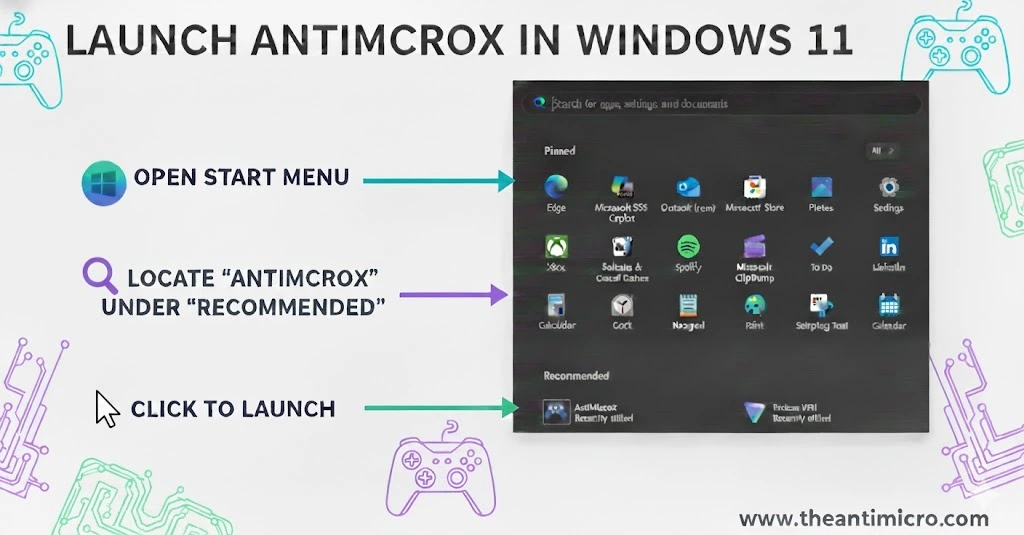
For Linux Debian, Fedora, openSUSE, Arch:
Click on the AntimicroX icon in the application menu or the search bar. You can also open the search bar and type:antimicroX to find your software icon.
Linux Flatpak:
Locate the AntiMicroX icon in your applications menu, or launch it directly from the terminal using this command:
flatpak run io.github.antimicrox.antimicrox
Linux AppImage:
Double-click the downloaded AppImage file to open it, or run it from the terminal in the same folder using:
./antimicrox-*.AppImage
Once you have done this,
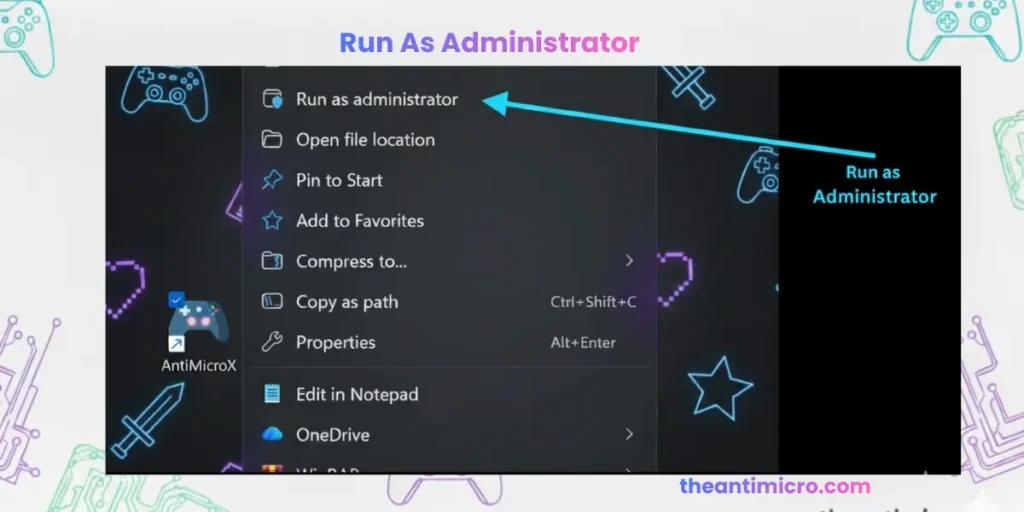
- Open AntimicroX
Right-click the icon and choose “run as administrator.”
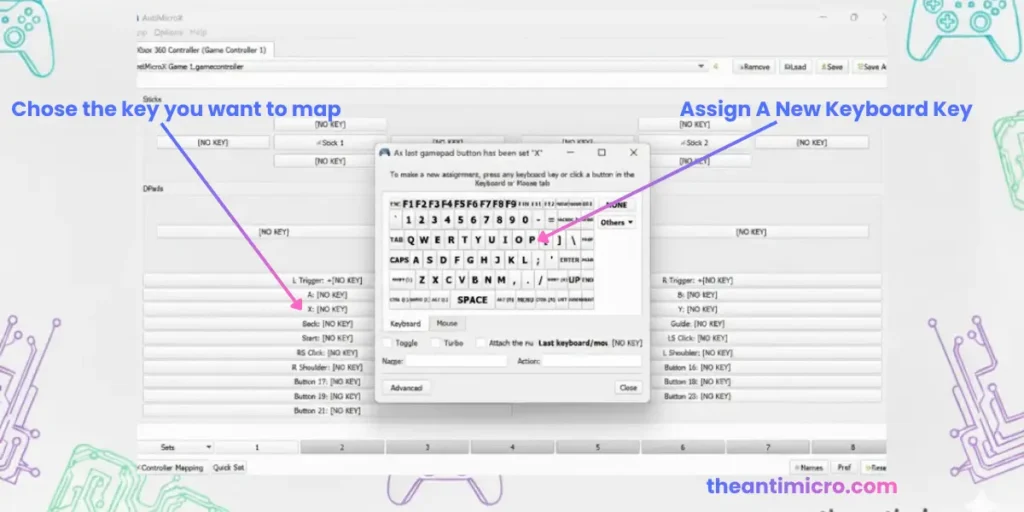
2. Open the software, click on controller input, choose the corresponding key, and map it.
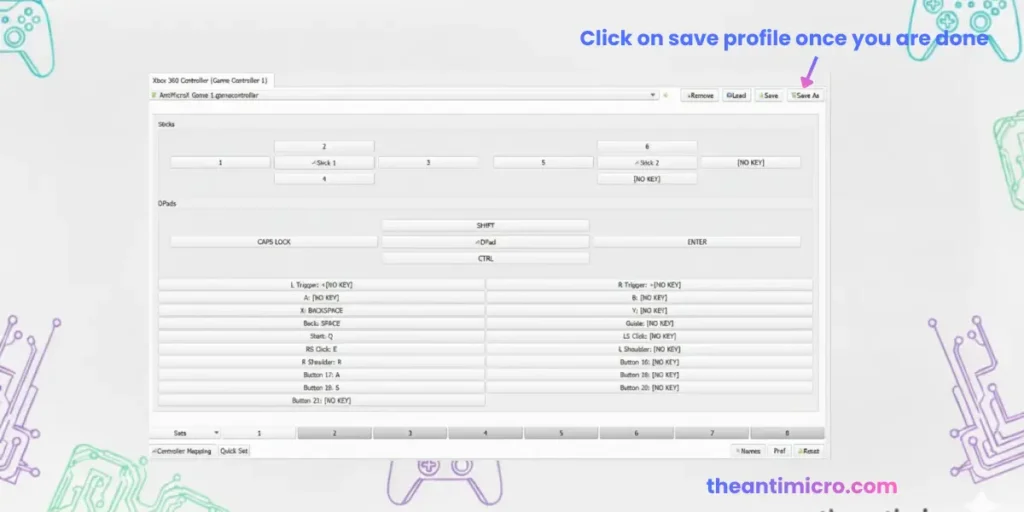
Once you have completed the configuration, save it as a profile for future use.
Don’t close AntimicroX, just minimize it.
Open any PC game you want to play.
Your controller inputs will be mapped into the assigned keyboard commands.
Now you can play your favourite PC games with your controller.
How to Download AntiMicro on Linux (Guide)
AntiMicro links for Linux are outdated, but AntiMicroX gives you the same features with active support. There are multiple ways to install it, depending on your distribution. Below are the simplest options so you can pick what fits your setup.
Option 1: AppImage (Easiest for Most Users)
Option 2: Debian or Ubuntu (.deb file)
Option 3: Flatpak (for Flathub users)
Option 4: Fedora / openSUSE / Arch Linux (Repos & AUR)
How to Set Up and Use Xbox, PlayStation, or Switch Controllers on PC With AntiMicro?
This section covers the basics. If you want a full AntiMicro tutorial, check out our detailed walkthrough on how to use AntiMicro.

Step 1: Plug In Your Controller
Connect your Xbox, PS4, PS5, or Switch pad. AntiMicro detects it as soon as it is active. Tabs appear for each controller, so you can switch between them if needed.

Step 2: Open AntiMicro
The program shows buttons and sticks on the screen. Press any button to verify input. AntiMicro highlights the control in real time, confirming that Windows drivers recognize your pad.

Step 3: Map Controls
Click a control box, then pick a keyboard shortcut or mouse controls. Here’s an example setup:
D-pad → arrow keys
A / Cross → jump
Right stick → map mouse movement to the gamepad stick for aim
Triggers → left-click/right-click
Repeat for movement, action keys, and anything unique to the game or emulator.

Step 4: Save Profiles
Save as AntiMicro profiles for games so you can load layouts later. Name them by title (ex, Classic FPS Layout, RPG Layout). AntiMicro can run portable too, so profiles travel with you.
Important Note on Using AntiMicro in Games
You can get banned for using AntiMicro if a game’s security system detects external input manipulation. Still, you can use AntiMicro safely for non-competitive play to reduce lag and improve input response. It’s a completely legitimate piece of software that lets you map your gamepad or controller buttons to keyboard keys. For safe use, stick to single-player titles, sandbox modes, or games that allow input remapping. Most players use it for titles like Fortnite Creative Mode or offline games to enhance their gaming response time without any risk. If your Antimicro is not working in the game, you can see the Antimicro troubleshooting guide.
Tips for Safe Use Of AntiMicro (Or Latest AntiMicroX) on PC
These best practices help you avoid input problems and protect your account in online games.
AntiMicro Download Review: Pros & Cons
We have used Antimicro for months across Linux Mint and Windows setups, mainly with a PS3 controller. It’s straightforward, lightweight, and does exactly what it claims: maps every key or mouse function perfectly to your gamepad. We have played older PC titles that had zero controller support, and this tool made them feel almost native.
✅ Pros
- Free and open-source software with an active community backing
- Simple setup and clean interface that’s easy to learn
- Works smoothly on Windows and Linux
- Supports nearly all major controllers and custom mappings
- Boosts accuracy and control in gameplay
- Great for older PC or emulator-based titles
- Allows full macro and turbo customization for advanced users
- Saves multiple controller profiles for different games
- Comfortable for long gaming sessions without constant mouse or keyboard use
- Reduces setup time through ready-to-load configurations
❌ Cons
- No official macOS (OSX) version yet
- Irregular update cycle across versions
- Some newer controllers may need manual setup
- Limited documentation for advanced configurations
- Turbo or macro features can be flagged in online multiplayer games
Best AntiMicro Alternatives (2025)
Need some other tools like AntiMicro or AntiMicro X? You can use Steam Controller Configuration to map buttons directly; it’s built into Steam and works for non-Steam games too. If you play titles that don’t support gamepads or want more freedom with your inputs, these tools do the job just as well. Here are other top alternatives:
DS4Windows (Windows)

Perfect if you use a PlayStation controller on PC. It turns your DualShock or DualSense into a virtual Xbox controller so every game recognizes it instantly.
Joystick Mapper (Mac)

One of the top AntiMicro alternatives for Mac, this paid app allows users to map keys, mouse actions, and scrolls to joystick or gamepad inputs.
JoyToKey (Windows)

One of the simplest and fastest mapping tools out there. It’s not flashy, but it works. You can map any button in seconds and jump straight into your game. Best for indie and emulator gamers.
reWASD (Windows)
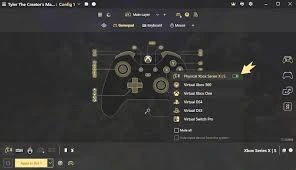
A powerful paid controller remapper for PC, offering deep customization, macros, and advanced input options. Perfect for gamers who want detailed control over any game, including titles without native controller support. Ideal for pro setups and complex controller layouts.
Final Words
AntiMicro (AntiMicroX) remains a solid choice for anyone who likes playing PC games with a controller. It’s free, reliable, and covers all the basic mapping needs without unnecessary setup. The original tool (AntiMicro) still works for simple mapping, but it has not been updated in years. AntiMicroX keeps the familiar layout and adds support for modern controllers, with auto-profiles and advanced scripts. It performs better on current Windows and Linux systems and continues to receive active patches. Anyone starting fresh or facing bugs on the old version should switch to AntiMicroX for smoother use and newer features. Download AntiMicro safely following our guide.
Disclaimer
This website provides all the information for educational purposes and to give authentic alternatives to the Keyboard and Mouse for gamers and gamepad lovers. This is solely an independent resource, and we are not affiliated with any official Antimicro / AntimicroX software.
All the resources provided here are openly available to the public.
We don’t claim any ownership either to the software/s or its trademarks.
All download links direct users to the original repositories or trusted sources (like GitHub). No files are hosted directly on this website unless they are freely and openly distributed under the original license.